Implementing Zoho CRM is one thing. Getting your team to actually use it is another. Most CRM implementations fail not because of technical problems but because of adoption problems: the team doesn’t understand why they’re using it, the training doesn’t connect to their daily tasks, or the system is configured so differently from their mental model that it creates more friction than it removes.
This guide covers how to train your team on Zoho CRM in a way that leads to genuine adoption — not compliance theatre where people log activities after the fact to satisfy a manager but the CRM data is always weeks behind reality.
Before Training: Get the Foundation Right
No training program overcomes a poorly configured CRM. Before you train anyone, verify three things:
- The CRM reflects actual workflows. If your team’s deal stages in Zoho CRM don’t match the stages they actually use in their sales process, every training session will generate the question “but where does [scenario] go?” and the system will start to feel like a bad fit. Configure the CRM based on your real process, then train on it.
- Data is clean on day one. Training on a CRM with 5,000 duplicate contacts and outdated records is demoralizing. Run de-duplication before training, archive stale contacts, and import only what’s relevant and current. The team’s first experience with the CRM should be a clean, usable dataset.
- Every person has their own login and relevant data visible. A sales rep should log in to see their accounts, their deals, their tasks — not a generic company-wide view. Configure role-based views and profile permissions before training, so day one feels personal and useful.
Core Training Principles
1. Train on scenarios, not features
The biggest mistake in CRM training is feature-oriented: “Here is the Contacts module. Here is how to create a Contact. Here are the fields. Here is how to filter.” This produces people who understand the interface but don’t know what to do when a real situation arises.
Train on scenarios instead: “When a new wholesale inquiry comes in, here is what you do: create a Lead, fill in these fields, set the source, and assign to yourself. Here’s how to convert it to a Deal when they express interest. Here’s what happens when you send a pitch — log it as an Activity and set a follow-up task for 5 days later.” Scenario-based training produces people who know what to do in the situations they’ll actually face.
2. Limit scope by role
A customer service rep doesn’t need to know how the deals pipeline works. A sales rep doesn’t need to know how to build a routing rule in Zoho Desk. Train each person on only the parts of the system they’ll use. Role-based training reduces cognitive overload and focuses attention on the workflows that matter for that person’s daily responsibilities.
3. Make the “why” explicit
People adopt tools they understand the purpose of. Before showing anyone a screen, explain why the CRM exists and what problem it solves for them personally. For a sales rep: “The CRM tells you exactly where every deal stands, what the next action is, and which accounts are at risk of going cold — without you having to track it in your head or a spreadsheet.” For a CS rep: “Every ticket shows you the customer’s full order history and any previous issues — you never have to ask a customer for their order number again.”
4. Use real data in training
Training on dummy data means the team mentally disconnects — “this is the test, not my real work.” If possible, train on real (or real-looking) records that the team will actually manage after cutover. When a sales rep sees their actual accounts in the CRM during training, it switches from abstract to immediately relevant.
Role-Based Training Approach
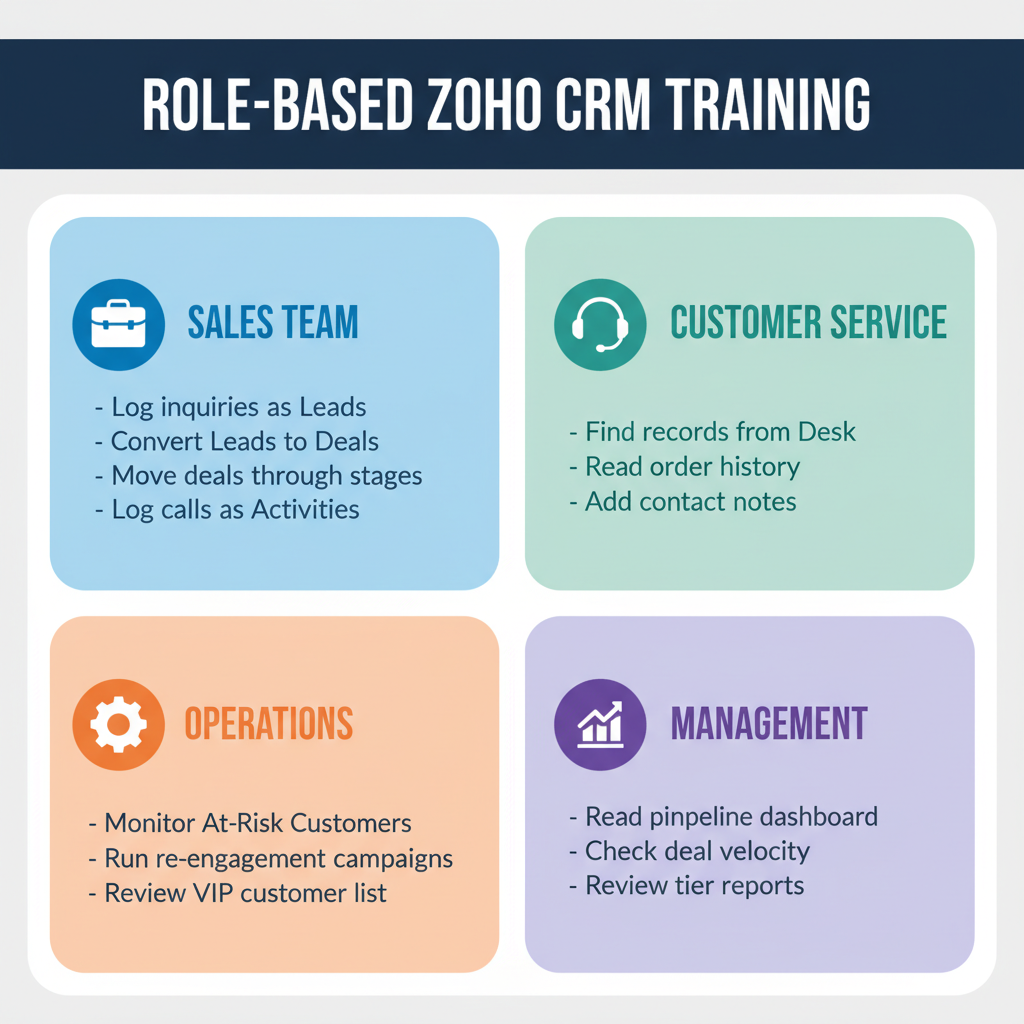
Sales / Wholesale Team
Core scenarios to cover:
- How to log a new wholesale inquiry as a Lead
- How to convert a Lead to a Deal when there’s real interest
- How to move a Deal through pipeline stages and what triggers exist at each stage
- How to log a call, email, or meeting as an Activity
- How to use the task system for follow-ups
- How to read their personal deal pipeline view
- How to find the accounts they own and check last contact date
Customer Service Team
Core scenarios to cover:
- How to find a customer’s contact record in Zoho CRM from a Zoho Desk ticket
- How to read a customer’s order history and previous ticket history
- How to add a note to a contact record
- How the VIP Customer Tier flag affects ticket priority (if configured)
Operations / Retention Team
Core scenarios to cover:
- How to read the At-Risk Customer view and what it means
- How to run a re-engagement campaign from a CRM list
- How to review the VIP customer list and flag for personalized outreach
- How to pull a contact export for a campaign
Management / Founders
Core scenarios to cover:
- How to read the pipeline dashboard
- How to check deal velocity and stalled deals
- How to read the customer tier distribution report
- How to use Zoho Analytics for the weekly ops review
Training Session Structure
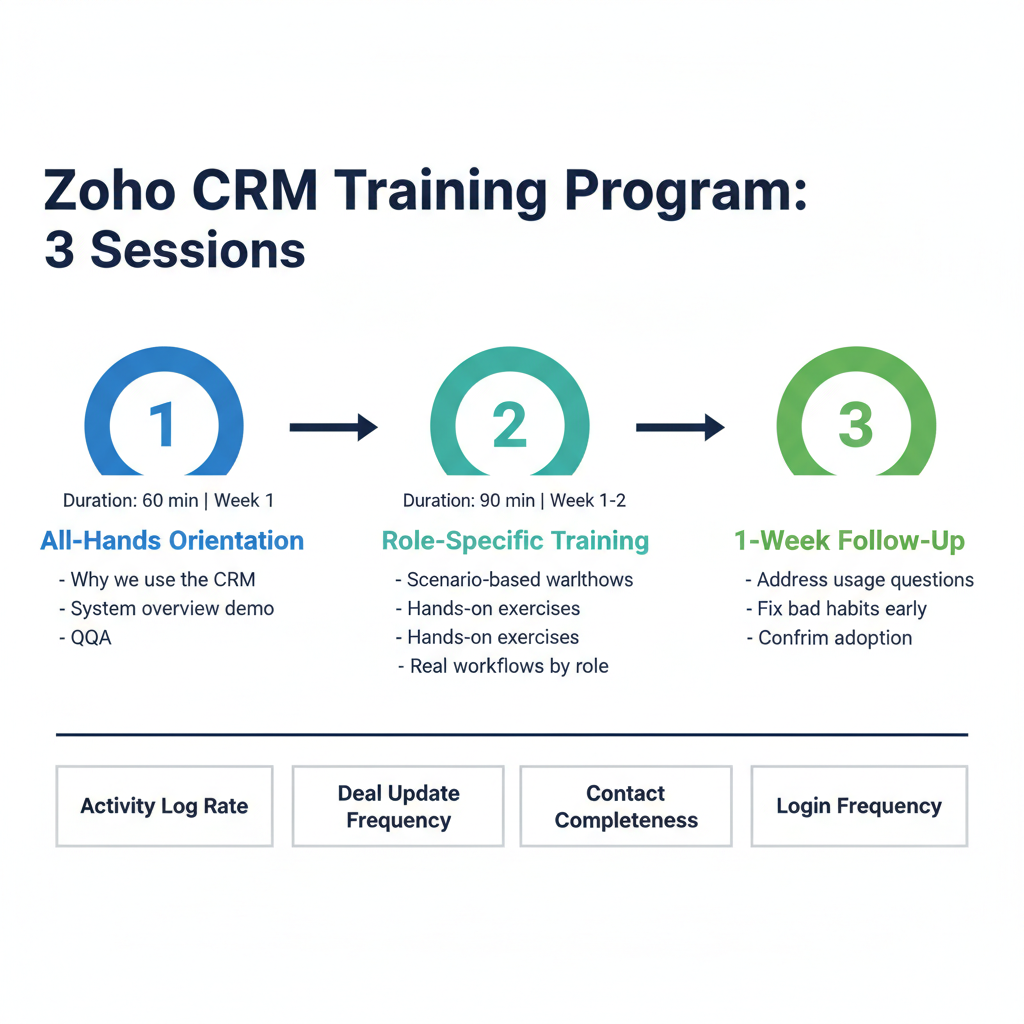
A typical CRM training program for an SME runs across three sessions:
- Session 1 (All-hands, 60 min): Why we’re using the CRM, what problem it solves, and a brief demo of the overall system. No hands-on — just orientation. End with Q&A.
- Session 2 (Role-specific, 90 min): Separate sessions for sales team and CS/ops team. Scenario-based walkthrough of the specific workflows each role uses. Hands-on exercises in a training or staging environment. Address the “but what do I do when…” questions that come up from real scenarios.
- Session 3 (1 week post-launch, 45 min): Team check-in after one week of real use. Answer questions that emerged from actual usage. Correct any bad habits before they become ingrained (e.g., people creating duplicate contacts instead of using the search first).
Reducing Data Entry Friction
Adoption drops in direct proportion to data entry friction. Every unnecessary field, every click to get to a relevant view, every time someone has to enter the same information twice is a dropout point. Friction-reduction tactics:
- Enable email BCC to CRM: Zoho CRM has a unique BCC email address per user. Reps BCC this address on every external email and it’s automatically logged as an activity on the relevant contact. Eliminates manual email logging for most reps.
- Install the Zoho CRM mobile app: For reps who do field sales or make calls from their phone — mobile activity logging takes 30 seconds instead of doing it at a computer hours later.
- Set required fields intentionally: Only require fields that are genuinely needed for the workflow to work. Required fields that nobody knows how to fill in correctly create workarounds (people put “N/A” in every required field) that corrupt data quality.
- Use the Zoho CRM browser extension: The extension auto-detects contact information from email signatures and websites, creating or updating CRM records without manual form filling.
Driving Ongoing Adoption
The most powerful adoption driver is using CRM data visibly in team meetings. When the weekly sales review is run from the CRM pipeline view — “OK, let’s look at the stalled deals report” — the CRM becomes the tool that matters, not the thing you fill in afterwards to satisfy a requirement.
Assign CRM data quality ownership. One person on the team is responsible for running the de-dup report monthly, checking for contacts with missing required fields, and flagging deals that haven’t been updated in 30+ days. This keeps data quality from drifting without requiring constant management intervention.
Recognize CRM usage publicly. When a rep closes a deal that was tracked from first contact in the CRM, acknowledge that the CRM process worked. Positive reinforcement of the correct behaviour is more effective than enforcing compliance through policy.
Measuring CRM Adoption
Track these metrics monthly to assess whether adoption is working:
- Activity log rate: How many activities (calls, emails, meetings) are being logged per rep per week? A rep having 20 customer conversations per week who logs 3 activities in CRM has an adoption problem.
- Deal update frequency: Average days since last update on open deals. If deals are sitting for 30+ days without activity updates, reps aren’t using the CRM for daily work.
- Contact completeness: % of contacts with all required fields filled in. Track monthly; should be at or above 90%.
- Login frequency: Zoho CRM logs in the admin panel show which users are logging in daily vs. weekly vs. not at all. Non-users need a follow-up conversation.
Need support with Zoho CRM training and adoption for your team? Learn about our SOP Development service or book a free discovery call.
Frequently Asked Questions
How long does Zoho CRM training take?
A structured training program covers three sessions over two weeks: a 60-minute all-hands orientation, 90-minute role-specific hands-on sessions, and a 45-minute follow-up one week after launch. Total training investment is approximately 3–4 hours per person. Expect 2–4 weeks after cutover before the team reaches confident, consistent CRM usage.
What is the biggest reason CRM training fails?
Feature-oriented training that doesn’t connect to real job scenarios. Teams learn how to navigate the CRM but don’t know what to do when actual situations arise. Training on specific scenarios (new lead comes in, a deal stalls, a wholesale account goes quiet) produces usable knowledge that lasts beyond the training session.
How do I get resistant team members to adopt Zoho CRM?
Understand the specific resistance. Most resistance falls into three categories: the CRM is configured badly for their workflow (fix the configuration); they don’t see a personal benefit (explain and demonstrate the direct benefit to their daily work); or they’ve been through failed CRM implementations before (acknowledge it, show them a timeline for when the system will be useful). Running pipeline reviews from the CRM in team meetings is the most effective single tactic for converting resistors.
Does Zoho CRM have training resources?
Yes. Zoho Academy provides free video training for Zoho CRM. The Zoho Knowledge Base covers every feature in detail. For team-specific training that covers your configured workflows and scenarios rather than generic platform features, a consultant-led training program is more effective than self-serve resources.
How do I maintain CRM data quality after training?
Assign a CRM data quality owner — one person responsible for monthly de-duplication, required field completion checks, and stale deal cleanup. Use CRM data visibly in team meetings so data quality has a direct incentive. Set up Zoho CRM’s built-in de-duplication rules to prevent duplicates on creation. Review data quality metrics monthly alongside sales metrics.
Keep reading
- How to Migrate from HubSpot to Zoho CRM Without Losing Data (2026)
- Shopify + Zoho CRM Integration: Complete Guide for Product Brands (2026)
- How to Automate Vendor Management with Zoho CRM
- Zoho CRM Automation: 10 Workflows Every Canadian SME Should Set Up (2026)
Need hands-on help? Explore our Zoho Implementation →
