Shopify handles transactions. Zoho CRM handles relationships. When the two systems do not talk to each other, your sales team is looking at half the picture: they can see what a customer enquired about in the CRM, but not what they actually bought. They can see deal history, but not returns or repeat purchases. The integration between Shopify and Zoho CRM fixes that — but only if it is set up correctly.
This guide covers every integration method available, what data actually syncs, how to use it for wholesale and B2B customer management, and what to watch out for. If you are a Canadian product brand running Shopify and Zoho CRM (or planning to), here is what you need to know.
Why Connect Shopify to Zoho CRM at All?
The argument for integration is straightforward: customer data should not live in two separate silos. When Shopify and Zoho CRM are disconnected, you get fragmented customer records, manual data entry, and sales teams operating without full context.
With a working integration, these workflows become automatic: a new Shopify customer creates a Contact in Zoho CRM. Every paid order creates a Sales Order or Deal, with full line-item detail. Customer lifetime value is calculable in Zoho Analytics without manual spreadsheet work. A wholesale inquiry submitted through your website triggers a Lead record with the customer purchase history already attached.
For Canadian product brands operating in the $1M to $20M range, this connection is the difference between a CRM that sits unused and one that drives real pipeline visibility.
Four Ways to Connect Shopify to Zoho CRM
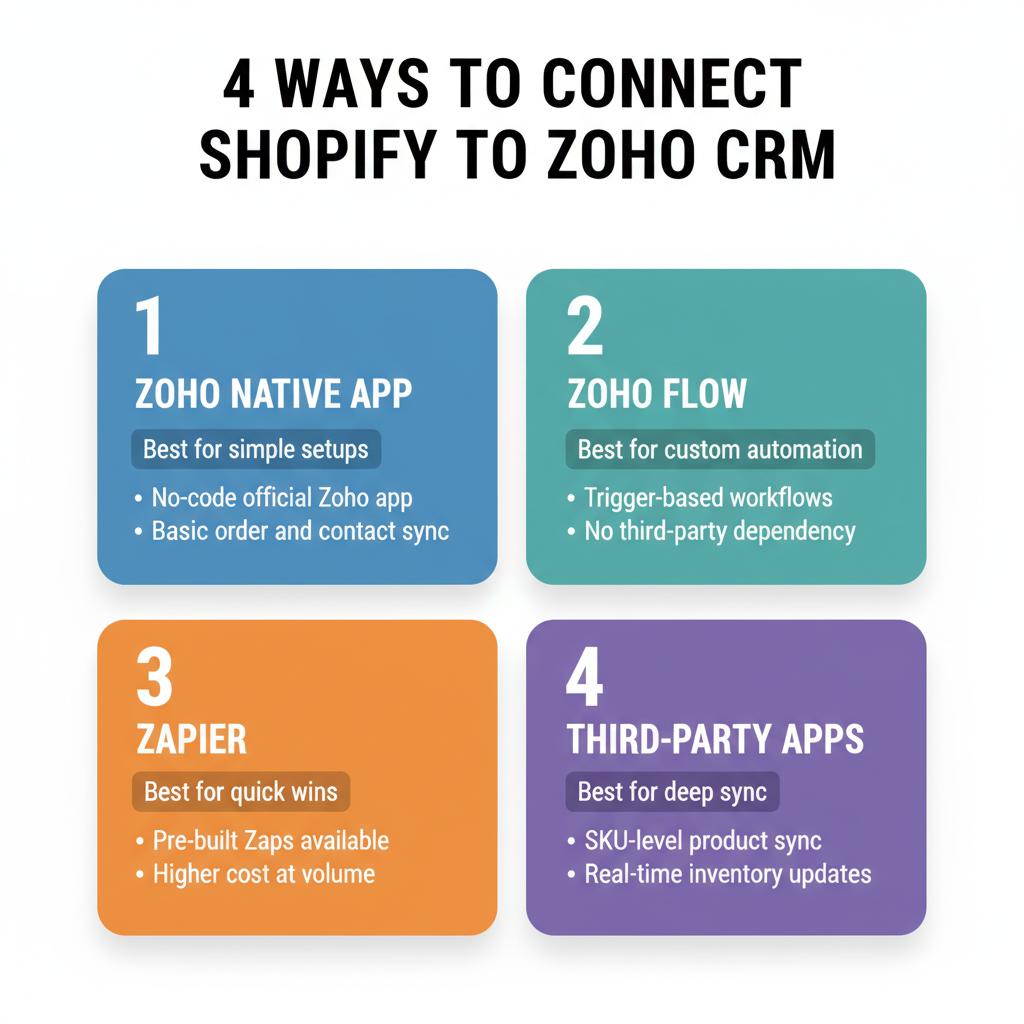
There is no single official Shopify-Zoho CRM integration. Zoho and third parties offer four distinct pathways, each with different trade-offs on cost, customization, and technical complexity.
Option 1: Zoho Native Shopify Extension
Zoho publishes a native Shopify extension in its Marketplace. It installs directly inside Zoho CRM — no Shopify App Store installation needed. It supports one-way (Shopify to Zoho) or two-way sync and is included at no additional charge with a paid Zoho CRM subscription.
The limitation is customization depth. Field mapping is constrained to the options Zoho ships. There is no support for backfilling historical orders, which means new records created after setup will sync but your existing order history stays in Shopify. Multi-store setups require a separate connection per store with no unified view.
Best for: brands that want a zero-cost starting point and do not need advanced field mapping or historical data.
Option 2: Zoho Flow
Zoho Flow is Zoho’s native automation platform — purpose-built for the Zoho ecosystem in the same way Zapier is built for general SaaS connectivity. It supports 600-plus apps including Shopify and can chain multiple Zoho products (CRM, Books, Inventory, Campaigns) in a single workflow.
Pricing runs approximately $10 per month for Standard and $25 per month for Professional. The key advantage over Zapier is that Zoho Flow understands the Zoho data model natively — it can create a Zoho CRM Contact, attach a Zoho Books Sales Order, and add a Zoho Inventory deduction in a single trigger-action sequence without workarounds.
Best for: brands running Zoho One or multiple Zoho products who want all their automation in one place.
Option 3: Zapier
Zapier is the most widely used middleware option for Shopify-to-CRM integrations. It connects Shopify to Zoho CRM without code and is familiar to most operations teams already using it for other workflows.
Pricing: Free plan for 100 tasks per month, Starter at $19.99/month for 750 tasks, Professional at $29.99/month. The critical detail is that Zapier counts each action in a workflow as a separate task. A three-step Zap — (1) new Shopify order, (2) create Zoho Contact, (3) create Zoho Deal — processing 500 orders per month consumes 1,500 tasks. Brands processing 1,000-plus orders per month will need to evaluate actual task consumption before committing to a Zapier plan.
Best for: smaller stores (under 500 orders per month) or brands already using Zapier for other integrations.
Option 4: Third-Party Shopify App Connectors
The Shopify App Store has several dedicated Zoho sync apps. The most notable is CRM Perks Zoho Sync, launched February 2024, which syncs Shopify Customers and Orders to Zoho CRM, Bigin, Inventory, Books, and Invoices. It creates Accounts, Contacts, Leads, or Sales Orders based on your configuration, and critically, it supports historical data backfill — syncing past orders from Shopify to Zoho CRM retroactively.
One documented limitation of CRM Perks: it cannot create a note in Zoho for each individual order. Teams that use order notes as part of their CRM workflow will need to account for this gap.
Best for: brands wanting order-level sync with historical backfill, without writing custom code.
What Data Actually Syncs
Here is what can move from Shopify to Zoho CRM, and where it lands:
- New customer (registered or guest) → Contacts or Leads module
- Customer email, phone, shipping address → Contact field mapping
- Order ID, line items, order total → Deals or Sales Orders module
- Product names and SKUs → Products module
- Payment status (paid, pending, refunded) → Deal stage or custom field
- Order tags and notes → Custom fields (manual mapping required)
- Abandoned cart → Lead or Quote (requires Zoho Flow or AquaAPI; not covered by native extension)
Sync direction is configurable: one-way (Shopify to Zoho) or two-way. Two-way sync is most useful for inventory updates flowing back to Shopify and contact enrichment (updated phone or address in CRM pushing back to Shopify customer record).
Sync frequency depends on the tool used: real-time via webhooks, hourly, or daily batch. Zapier and Zoho Flow both support real-time webhook-triggered syncs for new orders.
Using the Integration for Customer LTV Tracking
One of the highest-value outcomes of a working Shopify-Zoho CRM integration is the ability to calculate customer lifetime value at the contact level inside Zoho.
When every paid Shopify order creates a Sales Order linked to the same Zoho CRM Contact, you can use COQL (Zoho CRM query language) to aggregate total order value per contact, count order frequency, and calculate average days between purchases. Zoho Analytics can visualize this as a cohort dashboard, breaking LTV by acquisition source, first product purchased, or customer segment.
The prerequisite is consistent Contact deduplication. Guest checkout customers in Shopify — where the same email places multiple orders but no account is created — generate duplicate Contact records in Zoho unless deduplication rules are configured. Set up email-based deduplication rules in Zoho CRM before syncing historical data, or you will be cleaning up duplicate records for months.
Wholesale and B2B Customer Management
For Canadian product brands with a wholesale channel — selling to retailers, distributors, or food service accounts — the Shopify-Zoho CRM integration becomes significantly more valuable when combined with Shopify B2B functionality.
Shopify B2B (company-level accounts, custom pricing, net-30 terms) is only available on Shopify Plus, which starts at $2,300 USD per month. At that tier, company records from Shopify can sync to the Accounts module in Zoho CRM, with individual buyers nested as Contacts beneath the Account. Wholesale orders flow to the Deals module with custom fields for payment terms, assigned sales rep, and account tier.
For brands on standard Shopify plans that handle wholesale through manual invoicing or a separate channel, the integration is still useful: set up Leads in Zoho CRM for inbound wholesale enquiries, and manually create the Account-Contact-Deal structure. The sync then adds all Shopify DTC orders from that company email to the same Contact record, giving your sales team full cross-channel purchase history.
Re-Engagement Automation via Zoho Campaigns
A working Shopify-Zoho CRM integration unlocks automated re-engagement workflows that live in Zoho, not in Shopify email apps.
Example workflow: A Zoho Flow automation tags any Contact in Zoho CRM with “Lapsed – 90 days” when no new Shopify order has been synced in 90 days. That tag triggers enrollment in a Zoho Campaigns winback sequence. If a purchase comes in (synced from Shopify), the tag is removed and the campaign is paused. The entire sequence runs without manual intervention and without Klaviyo or an additional email platform.
This is particularly useful for brands that prefer a single vendor stack (Zoho One) over adding Klaviyo on top of Zoho CRM. If you are already paying for Zoho One, Zoho Campaigns is included — there is no marginal cost to this workflow.
Known Limitations to Plan Around
No integration is perfect. These are the specific limitations that cause friction in Shopify-Zoho CRM implementations and how to address them.
- Product variants not natively understood: Zoho CRM does not model Shopify product variants the way Shopify does (a single product with multiple size/colour options). Variants must be mapped to individual CRM Product records or custom objects. Plan this mapping before go-live.
- No native discount code sync: Shopify discount codes and coupon usage do not sync to Zoho CRM natively. If tracking promotional performance at the contact level matters to your team, this requires custom field mapping or a custom API extension.
- Guest checkout deduplication: Shopify guest checkouts with the same email create new Contact records unless deduplication is configured. Set deduplication rules on the Email field before syncing.
- No historical backfill on native extension: The Zoho Marketplace native extension does not backfill historical orders. CRM Perks or a one-time API import is required if you want pre-integration order history in Zoho.
- Multi-store requires separate connections: Each Shopify store requires its own integration connection. There is no native multi-store unified view without custom development.
- Free plan not supported: Zoho CRM free plan (3 users) does not support the Shopify Marketplace extension. Standard plan ($14 USD/user/month annual) or higher is required.
What Does the Integration Cost?
The total monthly cost of the Shopify-Zoho CRM integration depends on your tooling choice and Zoho CRM plan. Here is a realistic breakdown:
- Zoho native extension + Zoho CRM Standard ($14 USD/user/month): $14/month per user (integration tool itself is free)
- Zoho Flow Standard + Zoho CRM Professional: ~$10 + $23/user/month
- Zapier Starter + Zoho CRM Standard: ~$20 + $14/user/month = $34/month for 1 user, 750 tasks
- CRM Perks Zoho Sync: Pricing varies — check current Shopify App Store listing
- Custom API development: $5,000 to $50,000 one-time depending on complexity. Rarely justified unless you have bespoke data models or a development team in-house.
For most Canadian product brands at $1M to $5M revenue, the Zoho Flow or CRM Perks route at $30 to $50 per month total is the right starting point. Custom development is rarely needed until you are managing complex multi-store, multi-territory, or wholesale billing scenarios.
Pre-Integration Checklist
Before connecting Shopify to Zoho CRM, work through this checklist to avoid the most common setup failures:
- Define which Shopify events trigger CRM records (new order, new customer, abandoned cart, refund)
- Decide: Leads vs. Contacts for new customers (Leads if you want a qualification step; Contacts if you trust Shopify to source qualified buyers directly)
- Map product variants to Zoho CRM Product records before go-live
- Configure email-based deduplication rules in Zoho CRM
- Decide on sync frequency (real-time for support use cases; daily batch acceptable for analytics)
- Determine whether historical order backfill is needed; if yes, select a tool that supports it
- Test with a single Shopify test order before connecting production store
- Set up a Zoho CRM view or report to verify synced orders are landing in the correct module with correct field values
When to Get Outside Help
Zoho CRM implementation and Shopify-Zoho integration is a specialization. The native tools work well for straightforward use cases. Where brands consistently run into problems: complex field mapping (custom objects, multi-currency, wholesale pricing tiers), multi-store configurations, and getting historical order data into Zoho accurately without creating thousands of duplicate records.
ScaleOps Consulting configures Zoho CRM for Canadian product brands, including Shopify integration, field mapping, and workflow automation. If your integration is not giving your team the customer visibility they need, book a free discovery call and we will walk through what a proper setup looks like for your specific use case.
Frequently Asked Questions
Does Shopify integrate natively with Zoho CRM?
Zoho offers a native Shopify extension available through the Zoho Marketplace that installs directly inside Zoho CRM. It supports one-way or two-way sync and is included free with a paid Zoho CRM subscription. However, it has limited field mapping customization and does not support backfilling historical orders. For more complex needs, brands use Zoho Flow, Zapier, or third-party connectors like CRM Perks.
What Shopify data syncs to Zoho CRM?
The following Shopify data can sync to Zoho CRM: new customers (to Contacts or Leads), customer email, phone, and shipping address, order IDs and line items (to Deals or Sales Orders), product names and SKUs, payment status, and order tags. Abandoned cart data requires additional middleware. Two-way sync is possible but primarily useful for inventory updates and contact enrichment.
What is the best way to integrate Shopify with Zoho CRM?
For brands already deep in the Zoho ecosystem, Zoho Flow is the best integration tool — it connects Shopify to multiple Zoho apps in one workflow at around $10 to $25 per month. For brands using Zapier already, it works well for lower-volume stores at $20 to $30 per month. For Shopify-first brands wanting a dedicated sync with historical backfill, CRM Perks Zoho Sync on the Shopify App Store is the most purpose-built option.
Can Zoho CRM calculate customer lifetime value from Shopify orders?
Yes. When all Shopify orders sync to Zoho CRM as Sales Orders linked to a Contact, you can use Zoho CRM analytics, COQL queries, or Zoho Analytics to calculate LTV per customer: total order value, order frequency, and average days between purchases. This requires consistent field mapping so every order ties to the same Contact record, not a duplicate.
Does the Zoho CRM Shopify integration work with Shopify B2B?
Shopify B2B (company-level accounts, custom pricing, net terms) is only available on Shopify Plus at $2,300 USD per month and above. At that tier, company records can sync to Zoho CRM Accounts, with contacts nested beneath them, and wholesale orders can flow to the Deals module with custom fields for net terms and assigned rep. Standard Shopify plans do not have B2B company account features that map meaningfully to the Zoho CRM Account hierarchy.
Keep reading
- How to Connect Zoho CRM to Shopify: Complete Integration Guide (2026)
- How Extensiv Connects to Shopify, Zoho, and Your Tech Stack (2026)
- How to Migrate from HubSpot to Zoho CRM Without Losing Data (2026)
- How to Automate Vendor Management with Zoho CRM
Need hands-on help? Explore our Zoho Implementation →
