Multi-channel sales is the reality for most growing product brands. You’re selling on Shopify, wholesale to retailers, through Amazon or Faire, maybe directly to corporate accounts. Each channel has different customers, different margins, different sales processes, and different data. Managing all of this from one CRM requires deliberate setup — but done right, it gives you visibility that standalone channel tools never provide.
This guide covers how to configure and use Zoho CRM for multi-channel sales management: how to structure your data model to handle DTC, wholesale, and marketplace channels, how to track performance across channels, and how to automate the repetitive tasks that multiply when you’re managing more than one sales motion.
Setting Up Your Multi-Channel Data Model
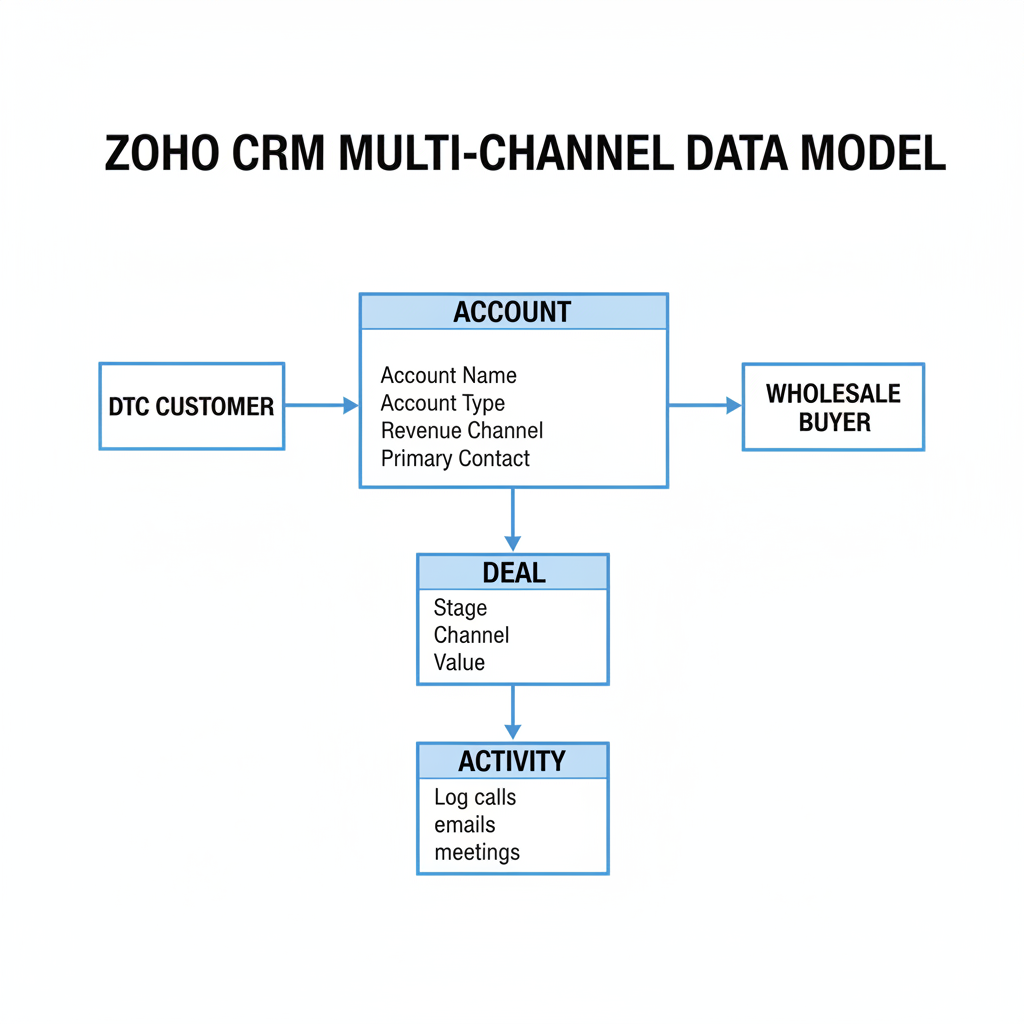
The foundation of multi-channel CRM is a data model that accurately reflects the different types of accounts and contacts you manage. In Zoho CRM, this means configuring Account Types and Contact Sources before you import any data.
Account Types
Create an Account Type picklist field on the Accounts module with values that match your channel structure:
- Wholesale Retailer
- Distributor
- Corporate / B2B Direct
- DTC Customer (for high-value individual customers worth tracking in Accounts)
- Marketplace (Amazon, Faire account relationships)
Contact Source
Set the Lead Source or Contact Source picklist to reflect where contacts come from:
- Shopify (DTC order)
- Trade Show
- Cold Outreach
- Referral
- Amazon / Faire Inquiry
- Website Form
Revenue Channel Custom Field
Add a Revenue Channel field to the Deals module — a picklist with: DTC Shopify, Wholesale, Amazon, Faire, Corporate Direct. This drives your channel-specific reports without relying on Account Type alone.
Tracking Revenue by Channel
Zoho CRM’s native deal tracking handles pipeline management. For multi-channel revenue visibility, you need a few additional pieces:
- Shopify DTC revenue: Sync via Zoho Flow — each Shopify order updates the linked Contact’s Total Lifetime Spend and Last Order Date. Aggregate DTC revenue comes from Zoho Analytics pulling the Shopify orders table directly, not from CRM deal records (there’s no individual deal per Shopify order for DTC).
- Wholesale revenue: Track in CRM Deals. Each wholesale order is a Deal record (or a renewal on an existing Account) with a Revenue Channel = Wholesale. This gives you pipeline tracking and actual revenue recording in CRM.
- Marketplace revenue: If you sell on Amazon or Faire, connect those data sources to Zoho Analytics separately. Track the relationships (account manager contacts at the marketplace) in CRM, but actual revenue reporting for marketplaces typically comes from the marketplace portal or a data connector.
The unified view lives in Zoho Analytics: one dashboard tab shows DTC Shopify revenue, wholesale deal revenue from CRM, and marketplace revenue from external sources, all in one place.
DTC vs. Wholesale Sales Processes
DTC and wholesale require different pipeline stages, different automations, and different data points in the CRM record. Zoho CRM handles this through multiple pipelines in the Deals module.
DTC Pipeline (for high-value customer nurturing)
- New Customer (first order)
- Active (2+ orders, engaged)
- VIP (meets LTV threshold)
- At-Risk (no purchase in 75+ days)
- Win-Back Campaign (in re-engagement sequence)
- Lapsed (180+ days, low recovery probability)
Wholesale Pipeline
- Prospect (store identified)
- Contacted (outreach made)
- Pitch Sent (line sheet delivered)
- Sample Requested
- Negotiation
- PO Received
- Active Account (reorder relationship)
- Churned (account went inactive)
In Zoho CRM, create two separate pipeline configurations under Setup → CRM → Deals → Pipelines. Reps select the appropriate pipeline when creating a new Deal. Views and reports filter by pipeline so the wholesale team sees wholesale deals and the DTC/retention team sees the DTC pipeline.
Managing Marketplace Accounts (Amazon, Faire)
Marketplaces are a distinct type of relationship — you don’t sell directly to individual customers through CRM, but you do manage the marketplace account relationship and any key contacts (e.g., your Amazon account manager, your Faire representative).
In Zoho CRM, create Account records for each marketplace channel: Amazon Canada, Faire. Link contacts (marketplace reps, account managers) to these Account records. Log calls, emails, and notes about the relationship — catalog review meetings, promotional calendar discussions, pricing negotiations.
For the operational side (listings, inventory allocation, performance metrics), those live in the marketplace portals themselves or in Zoho Analytics via a data connector. CRM handles the relationship layer; analytics handles the revenue performance layer.
Channel-Specific Automations
Wholesale Account Inactivity Alert
Trigger: Scheduled daily. Conditions: Account Type = “Wholesale Retailer” AND Last Order Date > 90 days AND Account Status = “Active.” Action: Create task for Account Owner to check in. This prevents wholesale accounts from quietly lapsing between your monthly sales calls.
New DTC Order Tier Check
Trigger: Contact “Total Lifetime Orders” updated (via Shopify Flow). Conditions: Total Lifetime Spend crosses VIP threshold. Action: Update Customer Tier to “VIP,” add to VIP email segment in Zoho Campaigns, notify Contact Owner.
Faire / Amazon Renewal Reminder
For marketplace account relationships with annual contracts or promotional calendar reviews — create a recurring task 30 days before the renewal or review date logged on the Account record. Keeps relationship management proactive.
Multi-Channel Reporting
Build a multi-channel revenue report in Zoho Analytics with four components:
- Revenue by Channel (Bar Chart): DTC Shopify, Wholesale, Marketplace, Corporate — side by side for current month vs. last month vs. same month last year. This is the single most useful executive view for a multi-channel brand.
- Wholesale Pipeline Value by Stage: Sum of Deal amounts in each wholesale pipeline stage. Shows pipeline health at a glance — are we building enough new accounts, or are we dependent on a few large accounts?
- DTC Customer Tier Distribution (Donut Chart): Percentage of active customers in each tier (VIP, Regular, At-Risk, Lapsed). A healthy retention operation should have a growing VIP percentage and a stable or declining At-Risk percentage.
- Top 10 Wholesale Accounts by Revenue (Table): Annual volume, last order date, and days since last order for your 10 highest-revenue wholesale accounts. Review weekly — when a top-10 account goes quiet, you want to know immediately.
Team Structure and CRM Ownership
For multi-channel to work in Zoho CRM, you need clear ownership rules. Without them, deals get double-counted, contacts go uncontacted, and the CRM devolves into a data dump.
- DTC contacts: Owned by the retention/email marketing lead. Automated workflows handle most of the management — the owner reviews VIP and At-Risk lists weekly.
- Wholesale accounts: Each account has a named sales rep as owner. Account ownership is assigned during onboarding and doesn’t change unless there’s a territory reassignment.
- Marketplace accounts: Owned by the business development or e-commerce lead. These accounts have fewer active tasks but regular relationship touchpoints.
Set up Zoho CRM views filtered by Account Type so each team member sees only the records they own and manage. A wholesale rep’s default view should show their wholesale accounts and active deals — not 50,000 DTC contacts.
Ready to configure Zoho CRM for multi-channel sales? Learn about our Zoho CRM Implementation service or book a free discovery call.
Frequently Asked Questions
Can Zoho CRM handle both DTC and wholesale in the same system?
Yes. Use multiple pipeline configurations in the Deals module to manage DTC and wholesale separately. Account Type and Revenue Channel custom fields distinguish channel data in reports. Views and automations can be filtered by channel so each team member works in a focused, relevant interface.
How do I track Amazon revenue in Zoho CRM?
Amazon transactional revenue is best tracked in Zoho Analytics via a data connector or CSV import from Seller Central. The CRM handles the account relationship (your Amazon account manager contacts, promotional discussions). Analytics combines Amazon revenue with other channel data for unified reporting.
Does Zoho CRM connect to Faire for wholesale management?
There is no native Zoho–Faire connector. Faire wholesale orders can be manually imported into CRM or synced via a Zapier or Make workflow using Faire’s API. The Account record for each Faire retailer can be created and maintained in Zoho CRM for relationship tracking, even if order data syncs via a separate path.
How do I prevent duplicate contacts across DTC and wholesale channels?
Use email as the primary de-duplication key across all channels. Run Zoho CRM’s de-duplication tool (Setup → Data Administration → De-duplicate Contacts) monthly. If a person is both a DTC customer and a buyer at a wholesale account, link the single Contact record to both the personal contact and the Account — don’t create two separate Contact records.
What is the best CRM for multi-channel product brands?
For Canadian product brands managing DTC + wholesale in the $1M–$20M range, Zoho CRM within Zoho One is the strongest option: it handles multiple pipelines, native Shopify integration, multi-channel analytics, and customer support in one platform. Salesforce is more powerful at enterprise scale but is significantly more expensive and complex for this business profile.
Keep reading
- How to Migrate from HubSpot to Zoho CRM Without Losing Data (2026)
- Shopify + Zoho CRM Integration: Complete Guide for Product Brands (2026)
- How to Automate Vendor Management with Zoho CRM
- Zoho CRM Automation: 10 Workflows Every Canadian SME Should Set Up (2026)
Need hands-on help? Explore our Zoho Implementation →
